
Customizing Time Management by Grade Level

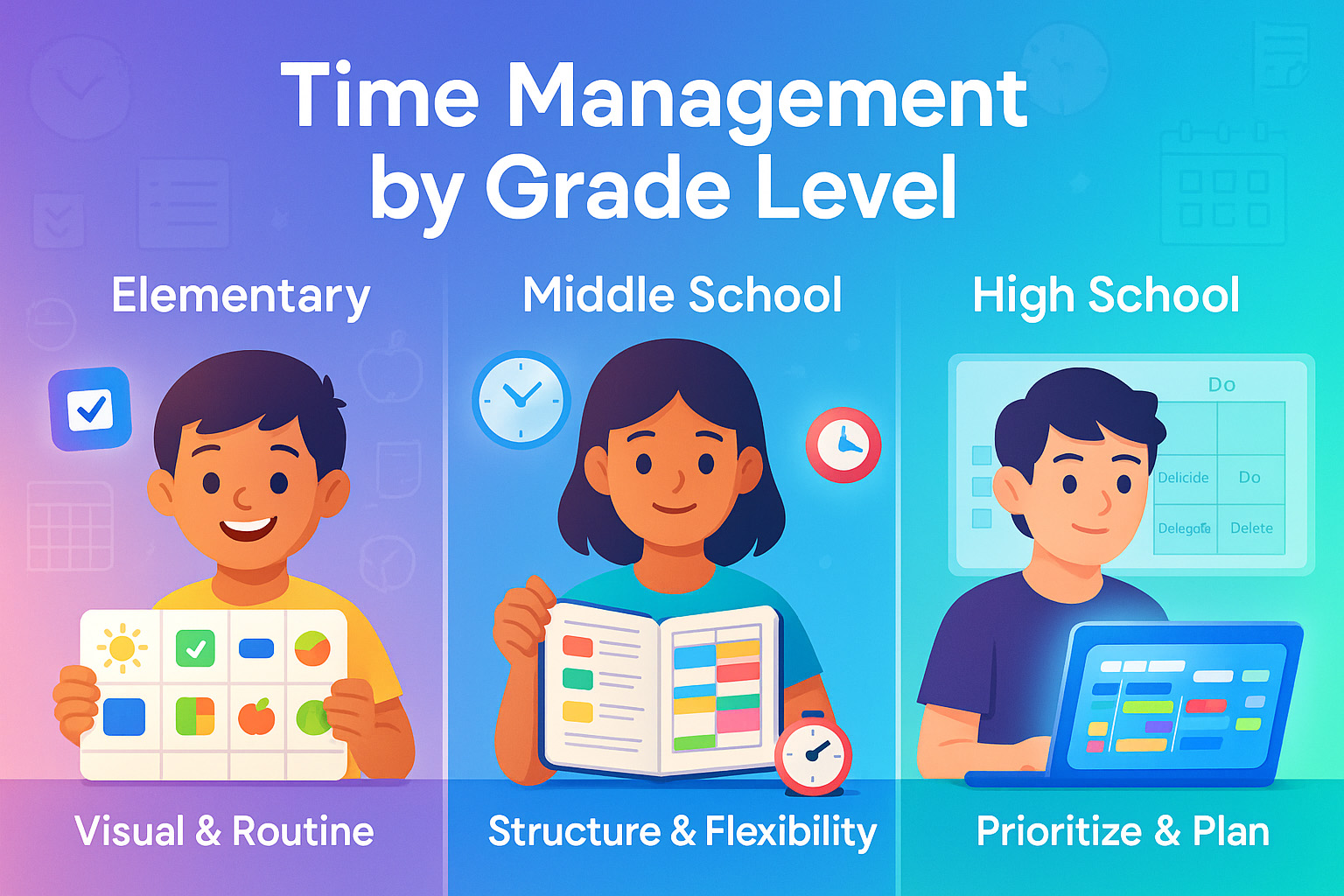
Some kids thrive with structure. Others? They rebel at the idea of a schedule. I’ve been both the student who color-coded every subject and the one who forgot their science project… twice. What I’ve learned through teaching, parenting, and flopping hard is this: time management isn’t one-size-fits-all. Especially not for students at different ages.
Young learners need visual nudges. Middle schoolers? They’re juggling hormones and homework. High schoolers, though, are practically swimming in pressure. If we try using the same strategies across the board, it backfires.
But there’s good news. We can make time management work for every student by adapting it by grade level.
- How attention spans change with age
- Time tools that work for each school stage
- Balancing activities, sleep, and school
- Using digital planners, visual charts, and goal-setting
If you’re a parent, teacher, or student trying to figure out why schedules fail or how to fix them this one’s for you. You’ll get practical, personal, and research-backed solutions for making time work in any classroom or home.
Why Grade-Level Time Management Matters
When I first tried getting my 8-year-old to use a daily planner, it was a disaster. She couldn’t read half the words. And honestly? She didn’t care. But when I switched to sticky notes and stickers boom. Tasks got done. That was my wake-up call: time strategies need to grow up with the student.
Kids change fast. From kindergarten to 12th grade, their brains are learning how to focus, manage impulses, and juggle demands. One method just won’t cut it. Here’s why:
Cognitive and Behavioral Shifts by Age
Elementary kids have shorter attention spans, and they’re mostly motivated by fun or routine. Middle schoolers start experimenting with independence, but they still need guidance. High school students? They’re expected to act like adults, but their executive function the brain’s planning and focus center is still developing.
It’s like trying to use a smartphone charger on a toaster. It just doesn’t match.
Time Management Strategies for Elementary School
I once walked into a second-grade classroom where every kid had a bright, color-coded schedule posted on their cubby. You know what? It worked better than any adult calendar I’d ever seen. Here’s what works best for these little learners.
Visual Tools and Routines
Young kids think in pictures. So I used visual charts with my son think green means go, red means stop to help him get ready for school. Color-coded calendars or sticker-based checklists help them see their progress. One parent I talked to even used LEGO blocks as a daily schedule: blue for breakfast, red for reading, yellow for recess. Genius. These can be paired with short attention-span study tips to keep them engaged.
Short Sessions and Breaks
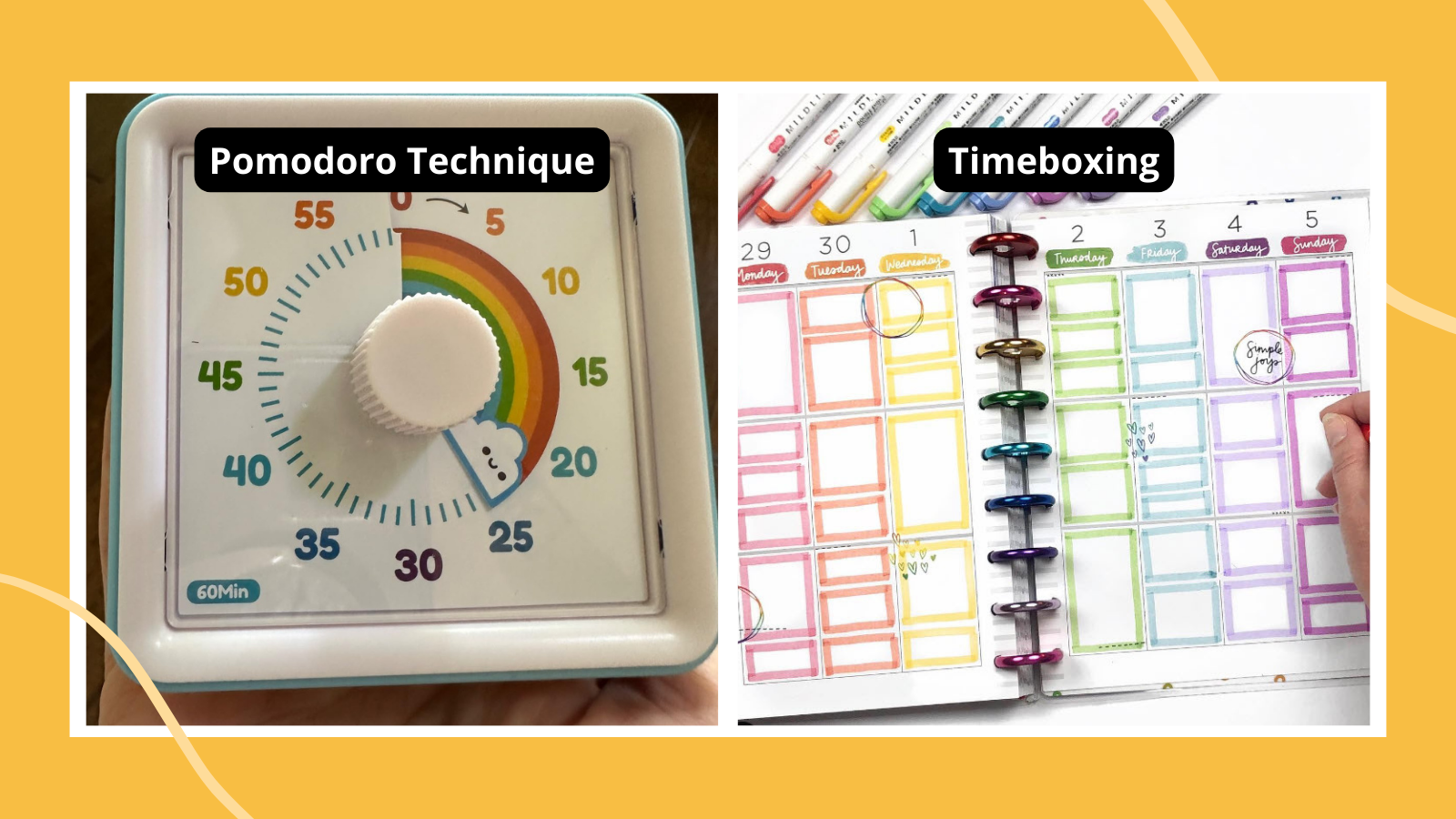
10- to 20-minute work blocks are perfect at this age. After that? They zone out. I kept a sand timer on the table when my daughter was in first grade. We’d do 15 minutes of reading, flip the timer, and then she got five minutes to draw or dance. That rhythm made learning less stressful and more sustainable.
Role of Parents
This age group still needs adult scaffolding. So don’t expect them to “just get it.” I had to model the habit by saying things like, “Let’s look at our schedule for the day together” or “What’s your first task after snack?” Eventually, they start asking those questions themselves.
Time Management Strategies for Middle School
Middle school is weird. One day they’re asking to bake muffins. The next they’ve got three group projects, volleyball tryouts, and no clue where they put their math homework. They crave more control but often forget the basics.
You can also blend in techniques like Pomodoro planning to break homework into manageable bursts.
Introducing Tools and Techniques
This is a great time to introduce planners. I gave my 7th grader a paper planner and a phone app, and let him choose which he liked. He picked paper. (Totally unexpected.) Time-blocking works well here assigning chunks of time for each subject because it helps reduce overwhelm and shows them where their time actually goes.
Building Flexibility and Independence
This age is full of new interests clubs, sports, social stuff. So the schedule can’t be rigid. I found success using a weekly planning ritual every Sunday: sit down together, map out the week, and build in buffer time. That way, they learn to pivot without falling apart when things shift.
Setting Goals and Tracking Progress
Middle schoolers love challenges, especially if they pick the goal themselves. I once challenged my student to finish his history notes before 6 PM every night for a week. We tracked it on a whiteboard, and he earned a badge (yep, just a doodle) for every success. He stayed consistent longer than I expected because he could see himself winning.
| Grade Level | Best Tool | Ideal Work Time | Key Support |
|---|---|---|---|
| Elementary | Visual Charts & Timers | 10–20 mins | Parental involvement |
| Middle School | Planners & Time Blocking | 25–40 mins | Weekly check-ins |
| High School | Digital Tools & Prioritization | 45–60 mins | Self-monitoring + light guidance |
FAQ
What are the best time management tools for students?
For elementary kids, visual charts or sticker calendars work best. Middle schoolers benefit from paper planners or apps like myHomework. High school students often use Google Calendar or Todoist for digital tracking.
How can I teach my child to manage time better?
Model it first. Show them how you plan your day. Start small one habit at a time. Use tools that match their age and give lots of praise when they stick to it. Weekly reviews can help reinforce progress.
Why does time management vary by age?
Because attention spans, responsibilities, and brain development all change. What works for a 7-year-old won’t work for a 17-year-old. Matching strategies to their cognitive stage helps them feel more capable and less stressed.
Is it okay to let kids take breaks often?
Yes. Breaks prevent burnout. Short breaks 5 to 10 minutes after focused work actually improve productivity and focus, especially for younger students. Just make sure they’re real breaks, not sneak-peeking TikTok for 40 minutes.
Time Management Strategies for High School
High school hits different. I’ve seen straight-A students completely overwhelmed because they never learned how to prioritize. One senior told me, “I just write everything down and hope I get to it.” That’s not a strategy that’s survival mode.
Prioritizing with Frameworks
Here’s what helped me and countless teens I’ve worked with: frameworks. The Eisenhower Matrix teaches them how to separate urgent from important. I like to have students list out all their tasks for the week and place them into one of four boxes Do Now, Schedule, Delegate, Delete. We even color code it. It forces them to pause and think before diving in.
Another one that works? The 80/20 Rule (Pareto Principle). I tell students, “What 20% of your work gets you 80% of your results?” For most, that’s reviewing notes before tests or starting essays early. Once they see where the value lies, they stop wasting hours on fluff assignments.
Digital Tools and Apps
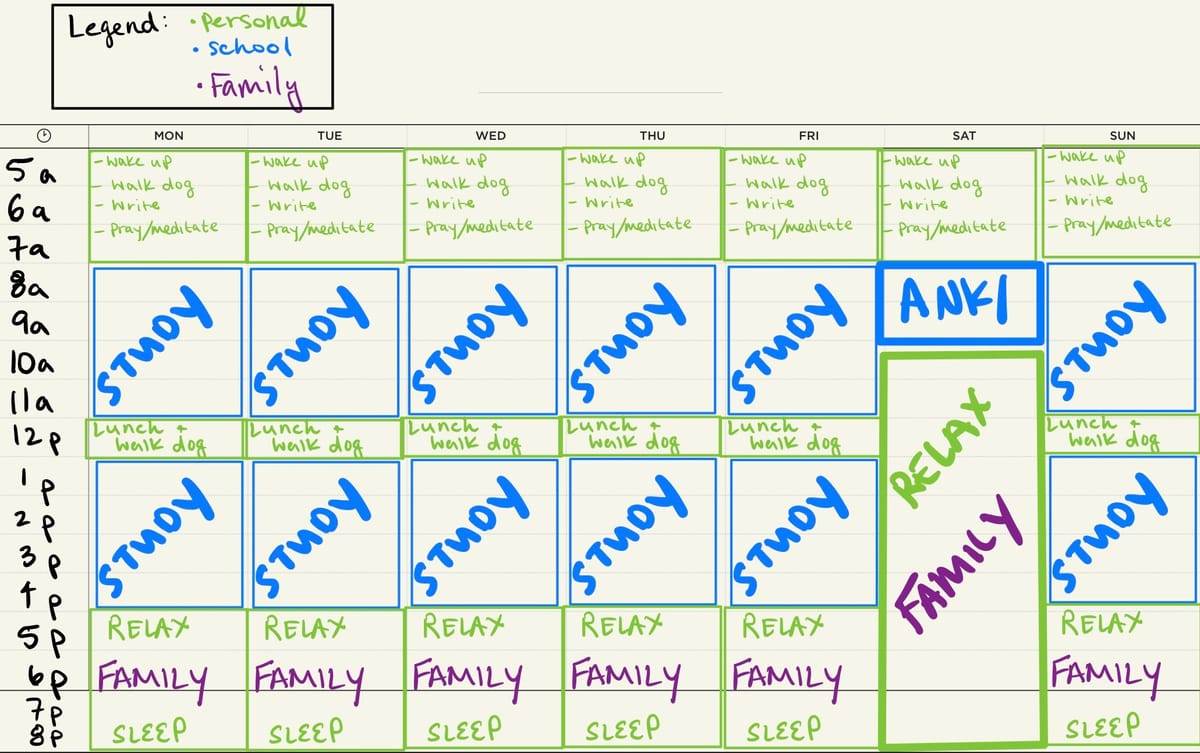
I love a good paper planner but let’s be honest, most teens are glued to their phones. That’s why tools like Todoist, Notion, or Google Calendar work so well. I recommend using time-blocking inside Google Calendar with color-coded class blocks, study blocks, and free time. Seeing the week laid out like this gives students back control.
One student I coached used a Notion dashboard with widgets for homework, deadlines, and goals. It was more aesthetic than practical at first, but once we added checklists and reminders, it became a tool she actually relied on.
Encouraging Sleep and Downtime
This is huge. I’ve worked with brilliant teens who crashed hard because they thought grinding until midnight was a badge of honor. It’s not. Consistent sleep restores focus, mood, and memory. According to the CDC, teens need 8–10 hours of sleep nightly (CDC), yet most get 6 or less.
So I talk about balance. Study hard, yes but also watch a show, walk the dog, or do absolutely nothing. I encourage students to schedule in downtime just like they would for math class. It matters that much.
Strategies That Work Across All Levels
No matter the age, there are a few rules of thumb that stick. I use these in my own life, and they apply to classrooms, kitchens, and everywhere in between.
Avoiding Over-Scheduling
This one’s personal. I once packed my middle schooler’s week with violin, robotics, and dance. We barely made it to Thursday. I now ask: Is there breathing room? Students need time to be bored, to daydream, to chill. Otherwise, everything feels like a grind and learning suffers.
We aim for 1–2 structured activities a day max. Any more, and we start skipping dinner or homework. Keep it manageable. Quality > quantity always.
Encouraging Self-Reflection
This is where the real growth happens. Every Friday, I ask my kids: “What worked this week? What didn’t? What do you want to try differently?” At first, they gave one-word answers. Now? They reflect. They analyze. One even said, “I need to stop starting projects at 10 PM.” Progress.
I’ve seen reflection journals help here. Just a few sentences a day: What did I plan? What did I do? How did I feel about it? It’s simple but so powerful.
Final Thoughts
Let’s bring it home.
We walked through why grade-level time management matters and how one-size-fits-all schedules just don’t cut it. From sticker charts in second grade to Eisenhower matrices in twelfth, the tools must evolve as students grow.
If you’re helping a student or are one remember:
- Visual aids and routines win in early years
- Middle schoolers thrive on flexibility and structure
- High schoolers need smart tools and balance
- All students benefit from reflection and downtime
The real takeaway? Good time management isn’t about squeezing more into a day. It’s about making room for what matters learning, growing, resting, and yes, even playing. Teach that, and you’re giving students a skill they’ll use forever.