Best Time Management Apps for Students in 2025

Managing time in school? It’s hard. Between lectures, group work, part-time jobs, and that one class that always has surprise quizzes, it’s easy to feel like you’re running behind.
In my sophomore year, I was constantly missing assignment deadlines not because I didn’t care, but because I had no clue how to juggle everything. Sticky notes? Too messy. Paper planners? Forgot them all the time. What finally helped me was finding the right time management app tailored to how I think and work.
Whether you’re constantly multitasking or just forget when your next exam is, the right tool can flip the game for you.
- Apps for organizing tasks and projects
- Tools for reducing procrastination
- Habit trackers and study-focused timers
- Academic planners that actually get school life
Here’s the thing there’s no “one-size-fits-all” when it comes to productivity. I’ve tested a bunch of these myself, and I’m laying it all out, from strengths and quirks to who each app is actually good for.
Why Time Management Matters for Students
Look, I’ve been there staying up till 2am trying to cram for an exam you forgot about. The truth is, without a solid way to track classes, assignments, and mental space, school becomes this endless loop of stress.
What really caught my attention is that over 70% of students admit they regularly procrastinate on deadlines. That’s not a moral failure it’s a lack of structure.
Discover how these apps can complement your study routine and bring structure to your day. If you’re looking for a foundation, our Time Management for Students hub covers smart scheduling, planning tools, and habits that actually stick.
How I Picked These Apps
I didn’t just scroll through the app store and call it a day. I tested these during semesters full of group projects, late-night study sessions, and club meetings that somehow always ran over.
I also asked two roommates (one of them’s a med student total chaos) what apps actually worked for them. Here’s what I focused on:
- Ease of use (can I use it without a tutorial?)
- Features that solve real problems (like forgetting due dates)
- Cross-device syncing (because sometimes I’m on a laptop, sometimes a phone)
- Bonus points if it helps me stop scrolling TikTok during Pomodoro breaks
I wanted to see which apps respected your brain. Some of us are list-makers. Some of us are visual learners. Some of us forget everything unless we see it in a calendar view. These picks cover all of that.
Top Time Management Apps That Actually Help
Todoist
This was my go-to when I needed to feel like I had my life together. It’s super customizable. I color-coded everything (assignments, group projects, “text mom back”), and it gave me the satisfaction of checking stuff off every day.
Best for: Type-A students who like structure and customization.
Cool Feature: Priority levels and recurring tasks that just work.
Why I liked it: It synced across my phone and laptop with no weird syncing delays. I even used it to track scholarship deadlines.
Trello
If you’re a visual person, this one’s your jam. I used Trello to plan a group presentation once and it was a total lifesaver. Everyone could see what tasks were done or pending.
Best for: Group projects and visual learners.
Cool Feature: Drag-and-drop Kanban boards.
Why it’s helpful: Seeing tasks move from “To Do” to “Done” feels oddly motivating. Also great for splitting project responsibilities.
TickTick
I wasn’t sure about this one at first. Then I saw the Pomodoro timer and built-in habit tracker and I was sold. I used this one during finals and actually stuck to my study blocks.
Best for: Students fighting procrastination.
Why it works: Combines task lists with Pomodoro timers and habit tracking so you stay focused and build routines. Learn more in our article on The Pomodoro Technique for Students.
Cool Feature: Calendar + Task + Habit tracking in one place.
Pro Tip: Set up focus timers before study sessions to stop yourself from randomly checking IG.
Forest
Okay, hear me out. You grow a virtual tree when you focus. If you leave the app, your tree dies. I know that sounds silly but when I really needed to concentrate, this worked. I even did it in a study group we planted a whole forest.
Best for: People who get distracted by their phone a lot.
Cool Feature: Real trees get planted when you stay focused.
Fun part: It becomes this little personal productivity game. Like your focus habits are saving the planet.
My Study Life
This one is designed just for students, which shows. I didn’t have to repurpose a task app it already knew I had classes, exams, and random changes in lecture halls.
Best for: High schoolers or college students juggling many subjects.
Cool Feature: Exam reminders and class schedule integration.
Why I still recommend it: I could pull up my week at a glance and know when I was totally booked or had breathing room.
Quick Look: Which App Fits You?
| App | Key Features | Best For | Platforms | Free/Paid |
|---|---|---|---|---|
| Todoist | Custom tasks, priorities, reminders | Solo planning | iOS, Android, Web | Free + Premium |
| Trello | Kanban boards, team collab | Group work, visual thinkers | iOS, Android, Web | Free + Business |
| TickTick | Pomodoro, calendar, habits | Procrastinators | iOS, Android, Web | Free + Premium |
| Forest | Focus timer, gamified | Easily distracted students | iOS, Android | Paid |
| My Study Life | Academic planner | School schedules | iOS, Android, Web | Free |
Google Calendar
I didn’t appreciate Google Calendar until I got overwhelmed one week and color-coded my entire life. Assignments, gym, sleep, lectures it looked chaotic, but I never missed anything that week. Plus, it plays nice with Gmail and class invites.
Best for: Students who already live in Google Workspace.
Cool Feature: Set recurring events and receive email or push reminders.
What helped me most: Blocking time for studying helped me treat it like a real appointment, which made me actually do it.
Microsoft To Do
This one’s perfect if you want something dead simple. I used it during my internship because the interface didn’t overwhelm me. Just make a list, check it off. That’s it.
Best for: Simple, cross-platform daily planning.
Cool Feature: My Day view resets every morning for a fresh start.
Pro tip: If you’re using Outlook for school, this integrates like a dream.
Notion / Evernote
Now we’re talking deep organization. I used Notion for everything class notes, reading logs, even a “college survival” page with links, goals, and memes. It’s a workspace, not just an app.
Best for: Students who want it all in one place notes, projects, ideas.
Cool Feature: Embedded calendars, toggle lists, database views.
Why I stayed: It helped me track class notes and assignment due dates in one place. That’s rare.
Egenda
This one doesn’t try to do too much. That’s what I like. I used Egenda in high school and it just… worked. I added tests and homework, got reminders, and it had a chill, clean interface that didn’t stress me out.
Best for: Simplicity-focused students in high school or early college.
Cool Feature: Color-coded classes and assignment categories.
Remember the Milk
This one’s like Todoist’s quirky cousin. It’s been around a while, and I know a few classmates who love the custom lists and reminders. You can create really specific task flows.
Best for: Students managing school and work/life tasks.
Cool Feature: Smart lists and tagging across areas of your life.
Why you might love it: If you’re juggling internships, classes, a side hustle this keeps all of it straight.
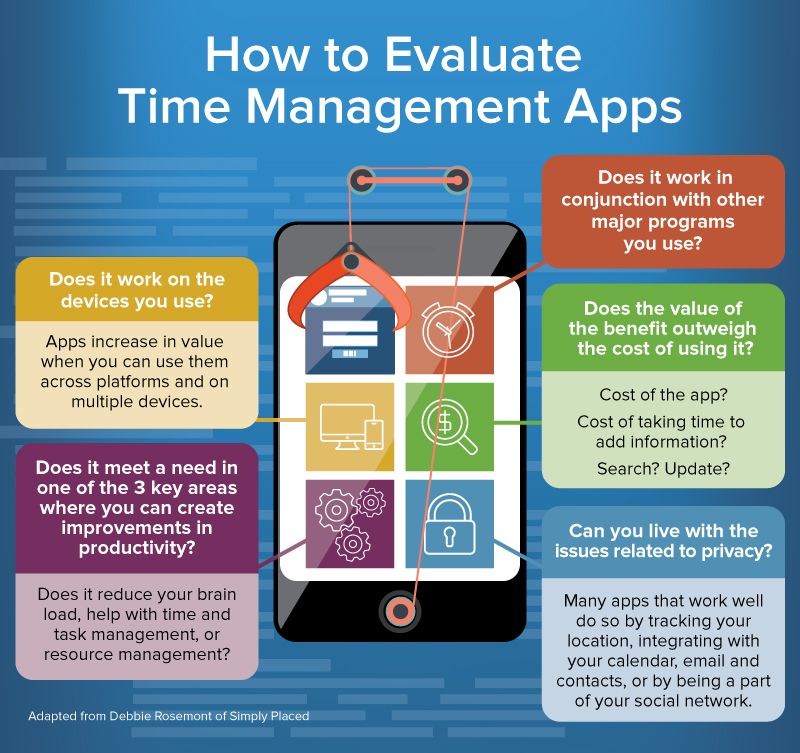
How to Choose the Right App for You
This part’s personal. It’s not just about what looks cool it’s about what fits your brain. I had to try a few before one stuck.
Ask yourself these:
- Do I need reminders or just a place to see everything?
- Am I a list person or do I like boards and visuals?
- Do I study better with timers or flexible planning?
Pairing apps works too. I used TickTick for focus sessions and Google Calendar to plan my week. There’s no rule saying you can’t mix tools.
Tips to Actually Stay Productive
Finding the app is only step one. Using it right is where the magic happens.
Block study time like a real appointment
Use calendar apps to schedule focused time. If it’s not on your calendar, it’s easy to blow it off.
Combine Pomodoro with tasks
Pair Forest or TickTick with your to-do list. Focus sprints + task lists = powerful combo.
Build habits with repetition
Apps like TickTick have habit trackers. Use them to build daily review rituals check your tasks, reflect, reset.
Color code like it’s an art project
Make your planners beautiful. Colors make it easier to notice what matters.
If you’re overwhelmed trying to fit it all into your phone or planner, our Daily Planning Templates for Students page is full of printable options.
FAQ
What is the best free time management app for students?
My Study Life and Google Calendar are totally free and built with students in mind. I used both before upgrading to TickTick for Pomodoro sessions.
Can time management apps help with procrastination?
Yes, especially apps like Forest and TickTick. They use timers and gamification, which made it easier for me to actually start tasks instead of putting them off.
How do I choose between Todoist and TickTick?
Todoist is better if you’re focused on task prioritization and labels. TickTick is awesome if you want timers and habit tracking too. I preferred TickTick during exams but switched to Todoist when managing job applications.
Are these apps available for iOS and Android?
Every app mentioned here is cross-platform iOS, Android, and most offer web access too. That mattered a ton to me, especially when bouncing between my phone and laptop.
Final Thoughts
Let’s be real school doesn’t slow down for anyone. I used to feel like I was always catching up, like time was running me instead of the other way around.
Here’s the best part: the right app won’t just keep you organized it gives you brain space. You stop worrying about what you forgot and start focusing on what you want to do next.
Each app here brings something different to the table. Whether you’re visual like me, a checklist addict, or someone who just needs less stress there’s something here for you.
Pick one. Try it for a week. Your future self will thank you.